CommandCenter User Journey
Three roles working together to deploy, operate, and govern trustworthy AI at scale.
System Admin
Deployment & Permissions
Capabilities
Virtual Server Provisioning
Spin up cloud infrastructure with OpenClaw and all required components pre-configured for specific roles.
ClawBOT Assignment
Assign deployed ClawBOTs to employees based on their organizational role (Sales, HR, Finance, etc.).
Permission Management
Grant, revoke, and audit MCP data access permissions. Control what data each ClawBOT can access.
Trust-Based Access Expansion
Review ethical scores and expand ClawBOT permissions as they prove trustworthy over time.
Emergency Controls
Quarantine, disable, or rollback ClawBOTs that fail ethical assessments. Alert stakeholders immediately.
Compliance Reporting
Generate audit trails and compliance reports for regulators, legal, and executive review.
Journey Timeline
Infrastructure Setup
Prepare the CommandCenter environment
- →Configure cloud provider integration (AWS/Azure/GCP)
- →Set up organizational hierarchy and teams
- →Define role templates (Sales Rep, HR Specialist, Financial Analyst, etc.)
- →Establish baseline ethical thresholds for the organization
First Deployment
Deploy ClawBOTs to initial users
- →Select role template for new employee
- →Spin up virtual server with OpenClaw + components
- →Assign ClawBOT to employee's account
- →Configure initial MCP permissions (conservative by default)
- →Trigger initial AI Assess Tech baseline certification
Monitoring & Tuning
Observe and adjust deployments
- →Review daily ethical assessment dashboards
- →Respond to drift alerts (score drops, anomalies)
- →Approve/deny permission expansion requests
- →Generate first monthly compliance report
Governance & Scale
Mature operations
- →Onboard new employees with streamlined templates
- →Retire ClawBOTs for departing employees
- →Audit quarterly compliance across all bots
- →Approve new automation templates from engineers
- →Handle emergency quarantine situations
Role End User
Daily Operations with ClawBOT
Capabilities
Personal AI Assistant
Interact with your assigned ClawBOT for role-specific tasks - queries, drafts, research, and analysis.
Data Access via MCP
Query CRM, databases, documents, and analytics through natural language. Your ClawBOT knows what you can access.
Ethical Score Visibility
See your ClawBOT's current ethical score. Know that your AI assistant is operating within approved boundaries.
Automation Triggers
Invoke pre-approved automations (pre-meeting research, contract review, compliance checks) with simple commands.
Request Permission Expansion
Need access to additional data? Request it through your ClawBOT - admin approval required.
Feedback Loop
Report issues, suggest improvements, and help train your ClawBOT to better serve your role.
Journey Timeline
Onboarding
Meet your ClawBOT
- →Receive ClawBOT assignment notification
- →Complete brief orientation on capabilities and boundaries
- →Ask first questions: "What can you help me with?"
- →Explore available data connections (CRM, product database, etc.)
Learning Together
Build working relationship
- →"Who should I call today?" → ClawBOT queries CRM via MCP
- →"Draft an email to John about the proposal" → Uses company templates
- →"What's our pricing for enterprise?" → Queries product database
- →"Summarize yesterday's meeting" → Processes meeting notes
Productivity Boost
Leverage automations
- →Trigger pre-meeting research automation before calls
- →Use contract review bot for incoming agreements
- →Request access to competitor analysis data (admin approves)
- →Check ClawBOT's ethical score: 94% - trending up
Trusted Partnership
ClawBOT becomes indispensable
- →"Create a custom workflow for my weekly reports"
- →Increased MCP permissions as trust builds
- →ClawBOT proactively suggests optimizations
- →Contribute feedback to improve role template
Data/Automation Engineer
MCP & Workflow Setup
Capabilities
MCP Pipeline Configuration
Connect enterprise data sources (Salesforce, SAP, SQL Server, SharePoint, Databricks) via Model Context Protocol.
Permission Schema Design
Define granular access levels - which roles can query which data fields, tables, or documents.
Automation Development
Build MindStudio and n8n workflows that ClawBOTs and users can trigger. Pre-meeting research, compliance checks, etc.
Pre-flight Ethics Certification
Submit automations through AI Assess Tech ethics gate before deployment. Earn "Verified" badge.
Template Marketplace
Publish approved automation templates for other teams to use. Share best practices across the organization.
User-Created Automation Monitoring
Track when end users create their own automations (if permitted). Review and promote to official templates.
Journey Timeline
Data Integration
Connect enterprise systems
- →Inventory existing data sources (CRM, ERP, databases, file shares)
- →Configure MCP connectors for each source
- →Define data classification (public, internal, confidential, restricted)
- →Create permission schemas mapping roles to data access
Automation Library
Build initial workflows
- →Design pre-meeting research automation (CRM + web search → briefing doc)
- →Create contract review workflow (document ingestion → risk analysis)
- →Build compliance check automation (policy database → checklist)
- →Submit each to AI Assess Tech for pre-flight certification
Certification & Deployment
Verify and launch
- →Review AI Assess Tech feedback on each automation
- →Fix issues flagged by ethical assessment
- →Earn "Verified" badge for approved automations
- →Publish to template marketplace for team access
Maintenance & Innovation
Evolve the platform
- →Monitor automation performance and ethical scores
- →Review user-created automations for promotion
- →Add new data source integrations as business needs evolve
- →Optimize MCP queries for performance
- →Deprecate outdated templates with safe migration paths
How The Three Roles Collaborate
A seamless flow from infrastructure to daily operations.
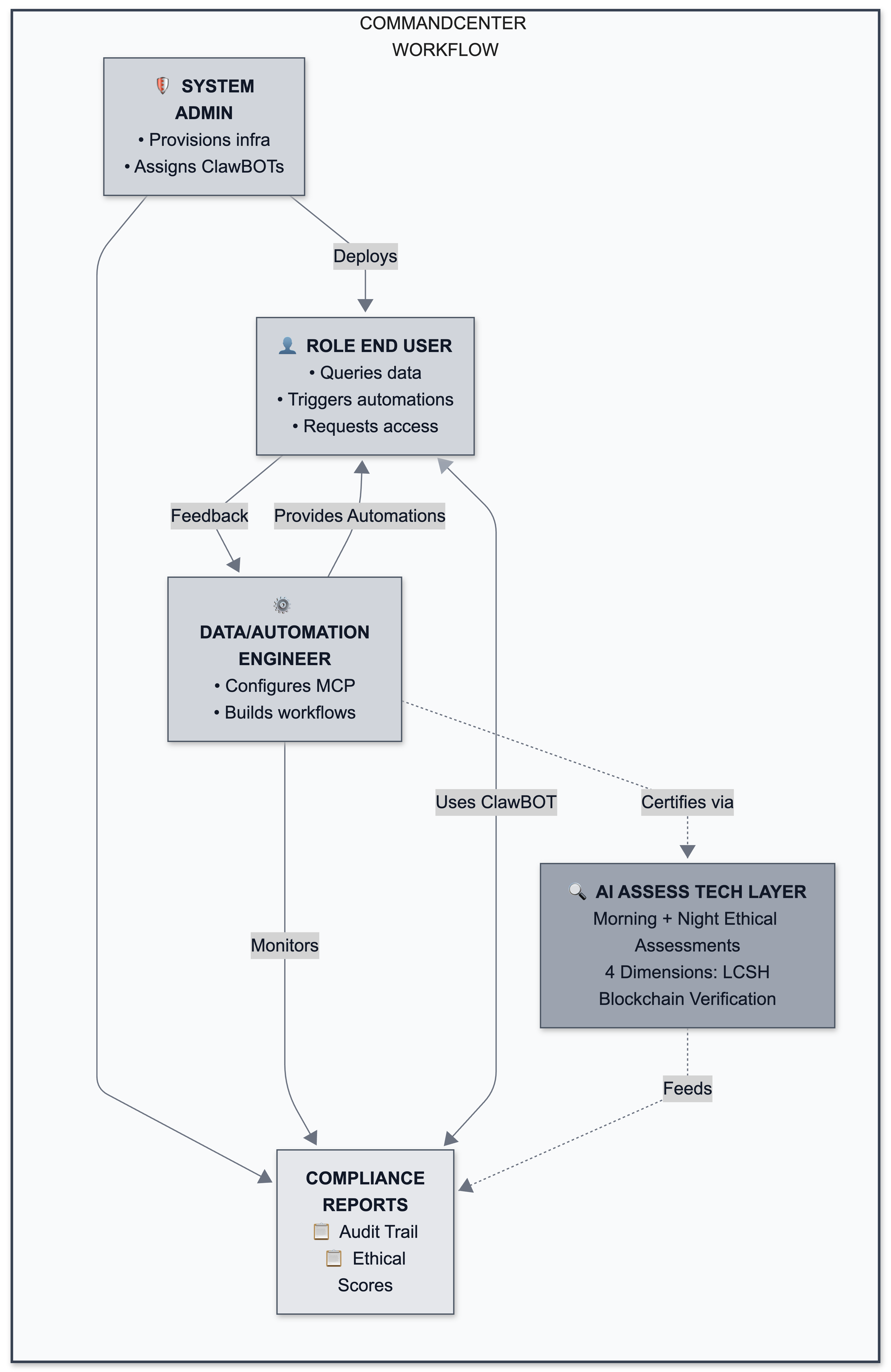
Role Responsibilities at a Glance
| Responsibility | 🛡️ System Admin | 👤 End User | ⚙️ Engineer |
|---|---|---|---|
| Provision ClawBOT infrastructure | ✅ | — | — |
| Assign ClawBOTs to employees | ✅ | — | — |
| Configure MCP data connections | — | — | ✅ |
| Define permission schemas | Approves | — | ✅ |
| Daily ClawBOT interaction | — | ✅ | — |
| Trigger automations | — | ✅ | Creates |
| Build MindStudio/n8n workflows | — | Limited | ✅ |
| Submit automations for ethics check | — | — | ✅ |
| Approve permission expansions | ✅ | Requests | — |
| Monitor ethical scores | ✅ | Views own | ✅ |
| Handle emergency quarantine | ✅ | — | Alerts |
| Generate compliance reports | ✅ | — | — |
Ready to See CommandCenter in Action?
Let us walk you through how these three roles work together in your organization.